What do you need before you start?
You need an iPhone with iOS 17 or later and the Steady Deen app, opened at least once.
The widget reads a list of verses that the app saves on your phone when you open it. It needs no internet connection, account or location, and you don’t have to set up prayer times first.
How do you add the verse to your Lock Screen?
You customize the Lock Screen and add the widget there. The steps below follow Apple’s guide for iOS 26 and iOS 27 and add the rectangle or the circle. What differs on iOS 17 and iOS 18, and the single line by the date, come after the list.
- Open the Steady Deen app once, so it can save the verses the widget shows.
- Touch and hold the Lock Screen until the Customize button appears. If it doesn’t appear, touch and hold again, then enter your passcode.
- Tap Customize. If you have more than one Lock Screen, swipe to the one you want to change before you tap.
- Tap Add Widgets. If this Lock Screen already has widgets, tap one of them instead.
- If there isn’t enough room for another widget, tap the Remove button on one you already have.
- Find Steady Deen, then tap or drag the Verse of the day rectangle or circle.
- Swipe down from the widget list, then tap Done.
In Apple’s guide for iOS 27, Done can also be an icon. On iOS 17 and iOS 18, tap Lock Screen after Customize, then Add Widgets.
The single line sits by the date. On iOS 17 and iOS 18, you add it by tapping the date instead of Add Widgets. Apple’s guide for iOS 26 and iOS 27 does not describe adding a widget by the date, so the steps above cover the rectangle and the circle only.
Steps 2 to 7 follow two Apple pages: the guide Create a custom iPhone Lock Screen, where you can choose your iOS version, and the article How to add and edit widgets on your iPhone.
Which form should you choose?
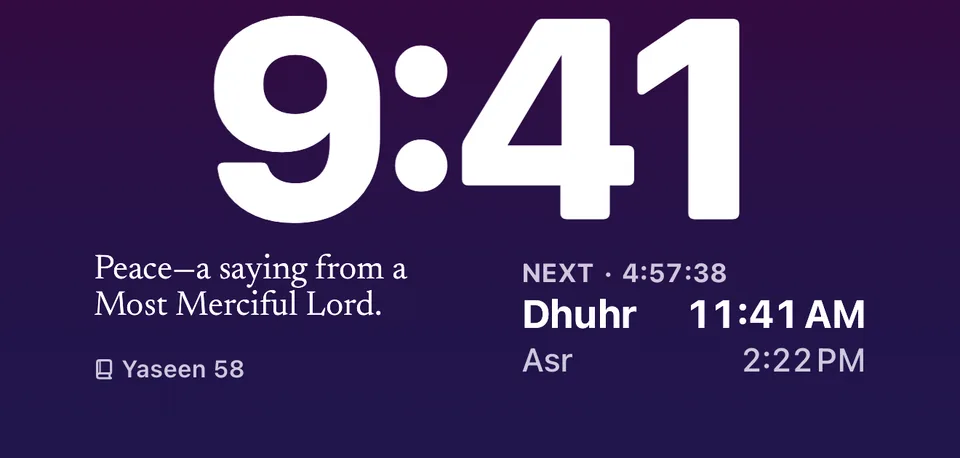
Choose the rectangle to read the verse itself; the circle and the single line show where the verse is from, without its text.
| Form | What it shows |
|---|---|
| Rectangle | The translation with the surah name and verse number; the Arabic text above them when it fits |
| Circle | The verse number with the surah name beneath it |
| Single line by the date | The surah name and verse number and, when there is room, the verse’s topic |
On some days the verse is a short passage of a few verses; the reference then gives the range.
The translation is never shortened. If the verse of the day is too long for the Lock Screen, the widget shows a shorter verse instead, which can differ from the one on a Home Screen widget.
The widgets page says where the verses come from, and Sources and licenses lists the Arabic text and the translations.
When does the verse change?
The verse changes once a day, at midnight on your phone.
Each time you open Steady Deen, the app saves the verses for 30 days, starting with that day. When that list runs out, the widget asks you to open the app once; it never shows an old verse.
What should you check if the widget is empty?
Open Steady Deen once. An empty widget means its saved list of verses is missing or has run out. The single line then says “Open Steady Deen”, and the rectangle says “Open Steady Deen once for today’s verse.” This happens when:
- You haven’t opened the app since you installed it.
- 30 days or more have passed since you last opened it.
The widget also skips verses on topics you have hidden in the app. If you have hidden every topic, it has no verse to show; bring a topic back in the app under Settings › Hidden topics.
If the verse is in the wrong language, change the app’s language under Settings › Language; the widget follows the app. If the widget stays empty, contact support.
Can you hide the Arabic text or change the look?
You can hide the Arabic text. In the app, open Settings › Widgets and turn on “Hide Arabic” under Lock Screen; the rectangle then shows the translation and the reference without it.
Lock Screen widgets have no theme: iOS draws them in its own style. The three widget themes are for the Home Screen.
What does the Lock Screen verse widget not do?
As of November 2026 (version 1.1), the widget does not do the following.
- It is not interactive: you can’t save the verse or move to another one. After the app’s first setup, tapping it opens that verse in the app, with its full source details.
- You can’t pick the verse, the surah or the translation.
- It plays no audio and is not a Quran reader: it shows one short verse, or a short passage of a few verses, a day.
- It does not explain the verse or issue religious rulings. For questions about your own practice, please ask a qualified scholar you trust.
What does the widget show about you?
Nothing you have written or recorded: it shows a verse and where it is from, never your notes, journal entries or practice records.
It reads a small, unencrypted summary that the app keeps on your phone, without your coordinates or your city, and it doesn’t connect to the internet. If anonymous usage statistics are on, they include which kinds and sizes of widget you added, sent once a day as a rough count. They also include which screen opened when you tapped a widget. See how widgets handle data.
Is the Lock Screen verse widget free?
Yes. As of November 2026 (version 1.1), every Steady Deen widget is free in every form and size, and none needs Steady Deen Plus, the optional subscription. See what’s free and what Plus adds.
What can you add next?
Verse of the day is also a Home Screen widget in three sizes; see how to add a widget to the Home Screen. For the next prayer, see how to add prayer times to your iPhone Lock Screen.